
Move Management Software
OfficeSpace's Move Management Software streamlines office relocations, seating changes, and adds through an AI-powered platform featuring digital floor plans with drag-and-drop seating assignments, automated customizable move notifications, and real-time occupancy analytics to reduce management stress and improve coordination.
Office Move Management
Forget the clipboard. Make moves in a click.
Take the stress out of managing office moves, adds, and seating changes with a user-friendly tool to coordinate large and small workplace moves.
Get started with OfficeSpace in 35 days.

Powered by AI Canvas
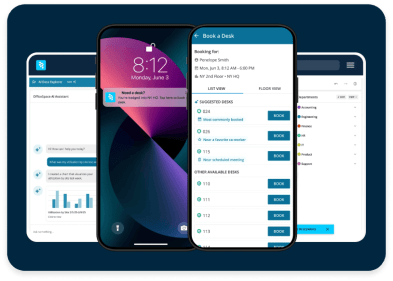
AI Canvas brings intelligence to every workflow inside OfficeSpace. It powers a team of workplace agents that automate planning, help employees connect and coordinate, and surface real-time insights, so you spend less time managing and more time leading.
Build digital move plans
Manage ad hoc seat changes and large-scale relocations in a single platform. Highlight seats and drag and dropseating assignments on a digital floor plan.
Automate move notifications
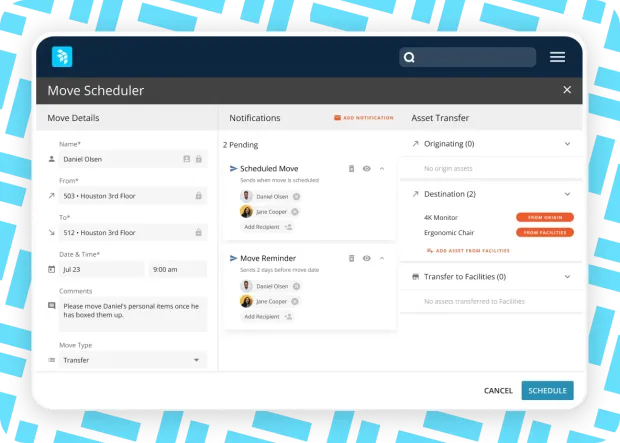
Customize move notifications so everyone understands what to expect and where to go for help.
Use data for move management
See real-timeoccupancy and utilization analytics directly on the floor plan, then identify and resolve move conflicts instantly on upcoming move orders.
OfficeSpace powers workplace excellence for 2,000+ teams globally
NextPrevious
Drag-and-drop move management
Visualize and complete moves, adds, and changes to seating assignments with ease.
Set space & seating assignments
Define space, seating, and neighborhood settings, control booking limits, and measure seat inventories by type, including assigned, bookable, reverse hoteling, vacant, and more.
Make move requests on floor plans
Drag and drop names on floor plans to generate move requests without tabular views that take occupancy planners away from floor plans.
Move by space type
Use configurable space type tags and headcount capacity data to query, search, sort, and filter, then consolidate move plans by space type class.
Customize move instructions
Visualize, orchestrate, and communicate move instruction steps for IT, HR, facilities, movers, and employees, including move dates, schedules, and changes.
Manage change and analyze trends
Process new hire and termination changes
Plan changes for new hires and terminations with digital smart queues.
Review change requests
Enable employee move requests for review and approval by move teams. Set workflows to automatically update location and move dates once moves are approved.
Track move history
Analyze individual, group, new hire, termination, and existing employee moves across sites in move reports.
Analyze occupancy & utilization data
See real-timeoccupancy and utilization analytics directly on the floor plan to inform planning.
INTEGRATIONS
Integrated out of the box
OfficeSpace comes fully integrated with Microsoft, Google, Slack, and Zoom.
Simplify the tech stack and keep work moving.
TAKE A TOUR
See it in action
Take a self-guided tour to see how you can manage moves, adds, and changes digitally.
Block and stack planning
Visualize space allocation by department, distribute teams across the floor plan, and fine-tune seating arrangements.
Scenario planning
Create potential floor plans based on demand and capacity and share with stakeholders for collaboration and approval.
Moves, adds, and changes
Bring floor plans to life, resolve seating conflicts, and let OfficeSpace handle the finer details of moves.
Insights hub
Access digestible reports and detailed metrics to accelerate decision-making and demonstrate impact.
CONTACT US
Ready to transform your office experience?
OfficeSpace helps companies save costs, connect teams, and optimize spaces with fast implementation and industry-leading client support.
35 Day
Implementations
SOC-2
AICPA Certified
Book a demo
utm_source
utm_medium
utm_content
utm_campaign
utm_term
Lead ID
- By clicking here, you agree OfficeSpace Software may contact you regarding relevant products & services. You can unsubscribe at any time. Click here for our Privacy Policy.
REVIEWS
Real talk from real users.
Read what other clients have to say on G2 — the world's most trusted software marketplace.
“At Dropbox, we use Move Manager to handle quick, one-off moves that happen almost daily—smaller reshuffles, seating new hires, terminations—and to orchestrate large-scale moves that involve in-depth planning and a variety of stakeholders."
Sean Germano
Project Manager Design & Construction, Dropbox
“Great for managing permanent desks including scheduled moves."
Verified User
Business Affairs Manager, Entertainment Industry
“OfficeSpace has been a huge part of my success. We've now completed over a thousand employee moves in the last two years."
Facilities Manager at PMI
FAQ
Questions? We're here to help.
Browse move manager FAQs. Don't see what you're looking for? Contact us.
What is move management software?
Move management software is designed to streamline and manage the workflow of relocating employees within a building or across multiple locations. This software functionality typically automates various aspects of the move process, including planning, scheduling, coordination, communication, and tracking of tasks and resources. Replacing outdated tools like spreadsheets, pen, and paper, move management software helps facilities teams to efficiently manage moves, minimize disruptions, and ensure a smooth transition to new spaces. Features include move planning, space allocation, inventory management, communication tools, and reporting capabilities.
Who uses move management software?
Space Managers and Facilities Managers are generally the primary users of move management software but all employees at a company benefit from having a software solution to facilitate ad hoc and large-scale office moves.
What are the benefits of using move management software?
One of the top priorities is optimizing space utilization. This involves strategic planning of office layouts to improve operational efficiency and employee satisfaction. Move management software helps visualize and plan space allocations to ensure optimal use of available space. A move management system helps streamline the entire moving process. This includes scheduling, tracking the movement of assets, and ensuring all elements of a move are aligned with organizational needs. This helps minimize disruptions and maximizes productivity during moves. It facilitates streamlined communication, ensuring that everyone is informed and can access critical information in real-time, preventing miscommunication and delays. The software often integrates with other facility management systems, which helps maintain consistency and accuracy of data across different platforms.
What are moves, adds, and changes in space management?
The "Moves, Adds, and Changes" (MAC) process is crucial for effective facility management, space and occupancy planning, and commercial real estate operations. This process supports the logistical aspects of workspace management including the relocation of employees, reconfiguration of spaces, and updating of resources in facility management systems of record by moving, adding, and changing employee seating assignments on floor plans.
What is the purpose of move management software?
Centralized move, add, and change SaaS software is essential for managing office and seating changes effectively. Such solutions provide a "single source of truth" for move plans and ensure better planning, execution, and monitoring of space allocations so that organizations can adapt flexibly and quickly to internal changes. Implementing technical support for managing the move, add, and change process helps teams optimize workspaces and maintain high levels of employee satisfaction and productivity.
How do you create a move management plan?
With OfficeSpace, space planners can collaborate with stakeholders to test floor plan scenarios and see what would work best for their offices and teams. With stack plans you can visualize set ups by department, understand capacity, and reorganize teams in a way that supports collaboration and productivity. When you connect the software to HRIS systems, new hires are automatically added to the move queue. Easily place them on the floor plan using drag-and-drop tools and ensure everyone has a place at work.
Workplace management solution for the built environment
Block & Stack Planning
Ditch manual processes, spreadsheets, and outdated software for intuitive drag-and-drop stack planning.
Scenario Planning
Test scenarios, manage supply and demand, plan for growth and contraction, and maximize space utilization with data-driven models.
Office Neighborhoods
Embrace flexible seating with “neighborhoods” or zones that support intentional work by team, activity, or work style to maximize productivity, whether it’s “me time” or “we time.”
Workplace Intelligence
Optimize your spaces, reduce real estate costs, and evolve your hybrid policies with usage and attendance insights you can act on.
Get more from your space, and connect the people in it
With intuitive tools to plan spaces, coordinate in-office days, manage desks and rooms, and optimize real estate portfolios—all in one platform for modern work.