
OfficeSpace Requests Slack Integration
OfficeSpace has introduced a Slack integration that allows employees to quickly submit and manage facility requests directly within Slack using commands like /request, while facility team members can accept, delegate, comment on, and resolve requests in real-time, with installation requiring OfficeSpace administrator approval and Slack permissions.
OfficeSpace Requests in Slack
The OfficeSpace Requests App makes facility requests quicker and easier for everyone. With Slack Integration, you will be able to submit and manage requests in Slack.
In order to install the app, you must be an OfficeSpace administrator.
Start by signing into OfficeSpace. Then, under ‘Settings’ click on ‘Connectors’.
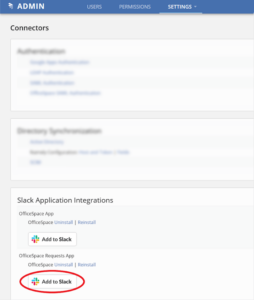
You should see this screen.
Clicking ‘Add to Slack’ will bring you to a prompt to sign in to your Slack team.

The following screen asks you to give OfficeSpace permission to access Slack data.
Once you click “Allow”, you will be ready to submit requests in Slack!
The Slack Team Admin will receive a Slack message notification that the OfficeSpace app has been installed.
With this integration, employees will be able to:
- Type /request in any channel to submit a request in seconds
- Type any issue (e.g. “Broken Chair”) into the OfficeSpace Requests App to submit a request
- Report maintenance issues and send move requests to your facilities team
- Get updates on your requests
Assigned members of your facility team can also:
- Accept and delegate requests in real-time
- Attach comments to any request
- Message the person who made the request
- Put a request on hold and make sure your SLAs aren’t negatively affected
- Close a request and mark it as solved or unsolved
- Reject a request in Slack and automatically notify the requestor
If you run into any trouble along the way feel free to email us: [email protected]
Qualified