
Workplace Intelligence Software
OfficeSpace's Workplace Intelligence software leverages AI-powered insights and automated workflows to help over 2,000 global teams optimize hybrid workspaces, refine return-to-office policies, reduce real estate costs, and accurately forecast seating and space needs through real-time usage and attendance data.
Workplace Intelligence
Solve the hybrid equation with Workplace Intelligence
Optimize your spaces, reduce real estate costs, and evolve your hybrid policies with usage and attendance insights you can act on.
Get started with OfficeSpace in 35 days.

Powered by AI Canvas
AI Canvas brings intelligence to every workflow inside OfficeSpace. It powers a team of workplace agents that automate planning, help employees connect and coordinate, and surface real-time insights, so you spend less time managing and more time leading.
Refine your hybrid strategy
Adapt RTO policies and track compliance with frictionless check-ins and accurate presence trends.
Save time, cut costs
Find opportunities to reduce real estate and streamline operations with holistic insight into your workplace.
Forecast accurately
Plan seating and space needs that match hybrid schedules and workplace trends.
OfficeSpace powers workplace excellence for 2,000+ teams globally
NextPrevious
Get insights to support your hybrid workforce
Visualize occupancy and attendance at a glance to identify patterns and trends and adapt your workplace policies.
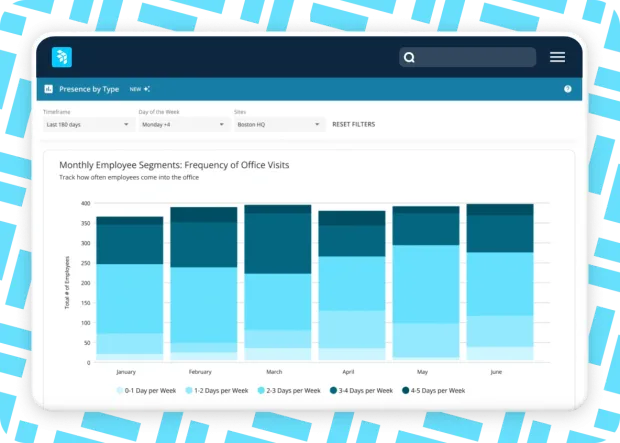
See presence by employee type
Understand your workforce mix (in-office, remote, or hybrid) to inform space decisions and measure compliance.
Expand your hybrid policy across locations
See which offices across the portfolio get the most attendance, compare hybrid policies and seating allocation by site, and use the data to inform your spaces and strategies.
Foster collaboration
Customize dashboards for informative insights, like which days certain departments usually come in, to inform in-office programming.
Optimize space across the portfolio
See occupancy trends across your portfolio and on every level—from entire offices down to a specific neighborhood—for strategic space planning.
Visualize attendance peaks and averages
View presence by site and see total employee visits per month, then drill down for more detail, like which days are busiest at each office, to inform space planning.
See daily utilization by site, floor, and neighborhood
Forecast seating needs to ensure adequate space for employees and visitors with detailed insights on utilization for any given day.
Streamline operations
Use data to plan maintenance and upkeep, like cleaning schedules that align with office utilization.
NEW: Group and filter spaces by function and category
Classify every space by how it's used with standardized functions and customizable categories and space types. Keep floor plans, reporting, and analytics consistent across every building while making it easy to analyze work-mode mix, benchmark space composition, and plan your space.
Make informed real estate decisions
Track utilization trends across the portfolio to make decisions on lease expansions or downsizing.
See utilization over time
See and compare how busy your sites get over time or week by week.
Forecast space needs
Leverage accurate presence and utilization trend data to adjust workforce planning and right-size real estate footprints.
Compare seating capacity with actual usage
See and compare utilization for assigned seats versus bookable desks to adapt seat-sharing and desk booking policies and inform smart space planning.
Actionable insights in one place
Measure employee engagement and business outcomes with smart integrations and real-time data.
Get reliable presence data
Seamlessly track attendance with integrated badge and WiFi sources and desk booking for accurate results without manual input.
Connect your systems
Seamlessly integrate data from Human Resources and IT systems and real estate tools.
Integrate your tools
Enhance flexibility and functionality with robust APIs that connect with your existing software.
Analyze your findings
Gather presence data by site down to the employee level, and export reports to refine hybrid policies and measure impact.
Workplace Intelligence dashboards for data-driven hybrid solutions
Presence by site
Explore attendance at your sites over a given date range.
Presence by department
Visualize office usage by department.
Presence by type
Compare remote, hybrid, and in-person employee trends.
Daily presence report
View and export raw presence data down to the employee level.
Daily utilization by site
Monitor daily fluctuations in office usage.
Utilization over time
Track how busy your sites get over longer periods.
Utilization by floor
Monitor daily utilization fluctuations of assigned and bookable seats by floor.
Utilization by neighborhood
Discover the daily utilization of your neighborhoods.
INTEGRATIONS
Work smarter with seamless integrations
Save time and boost adoption with a streamlined tech stack.
TAKE A TOUR
See it in action
Take a self-guided tour through workplace intelligence dashboards.
Asset Management
Gives teams total visibility and control over every item in your facility—from laptops to large equipment—before costly breakdowns happen.
Asset Management Implementation
Getting started with OfficeSpace Assets is simple, easy, and only takes a few minutes to get set up, so you can start tracking assets on day one.
Block and stack planning
Visualize space allocation by department, distribute teams across the floor plan, and fine-tune seating arrangements.
Desk booking
Unlock easy ways to find and reserve optimal seats, automatically free up vacant desks, and enable desk lending to maximize utilization.
CONTACT US
Ready to transform your office experience?
OfficeSpace helps companies save costs, connect teams, and optimize spaces with fast implementation and industry-leading client support.
35 Day
Implementations
SOC-2
AICPA Certified
Book a demo
utm_source
utm_medium
utm_content
utm_campaign
utm_term
Lead ID
- By clicking here, you agree OfficeSpace Software may contact you regarding relevant products & services. You can unsubscribe at any time. Click here for our Privacy Policy.
REVIEWS
Your success is our success.
Read what other clients have to say on G2—the world's most trusted software marketplace.
“ Before Workplace Intelligence, we spent 30 minutes a day cleaning badge data manually which is prone to errors and extremely tedious. Lots of departments are interested in this data, from HR and team leads, all the way to our executive team. Now we can schedule reports and keep everyone on the same page. You’ve hit the nail on the head and we depend on these analytics to make decisions.”
iCIMS
“We use Workplace Intelligence to get accurate insights about utilization, make reliable recommendations to our C-Suite and right-size our real estate footprint. We spent 6 hours a month gathering and cleansing data from multiple badge systems, and Workplace Intelligence gives us insights we didn’t have before like peak vs. average attendance. We can also drill down to the employee level so we can evaluate and update our policies.”
Osaic
"Our executive leaders want to understand how our space is being utilized, and whether should we start assigning desks again. Before Workplace Intelligence, we were frustrated by how many systems we had to use to get to the insights OfficeSpace provides: one for leases, one for booking at HQ, and another for badge data. Now, we can bring all those things together in one platform without having to create dashboards in our BI tool. That gives us speed and insight we can act on."
Mutual of Omaha
"With Workplace Intelligence, we’ve significantly reduced the amount of time it takes to collect, de-dupe, and cleanse data, and we can schedule automated reports to keep everyone informed on changes in utilization. It’s really helped us access information that we used to have to collect manually."
DexCom
"Before Workplace Intelligence, we would spend entire weeks gathering data manually—it was all we focused on. Now we can uncover bottlenecks and right-size seating for every team."
Oaktree Capital
FAQ
Questions? We're here to help.
Browse workplace intelligence FAQs. Don't see what you're looking for? Contact us.
What is workplace intelligence software?
Workplace intelligence software is the powerful tool behind top tier facility management teams. Intelligence tools collect presence, utilization, and financial data from a variety of sources so facility managers and space planners can optimize spaces and operations and save on costs.
What are workforce analytics?
Workforce analytics is the process of collecting and analyzing workforce data to make informed decisions about the workplace. Software like OfficeSpace collects data through automation, and feeds that data into easy-to-interpret reports for quick decision-making.
Which data sources can workplace intelligence use?
Workplace intelligence combines data from a variety of sources: Wi-Fi, sensors, and badges, utilization data on desk booking and room booking, and financial data. This is one of the clearest examples of AI in the workplace at work.
With the ability to compare metrics, like meeting room capacity versus occupancy, your team can visualize ways to improve the efficiency of the workplace, from reallocating spaces to consolidating the team to fewer floors. When you add financial data to the mix, you can see exactly how much the organization is spending down to the square foot and make strategic business decisions.
Workplace management solution for the built environment
Moves, Adds & Changes
Take the stress out of managing office moves, adds, and seating changes with a user-friendly tool to coordinate large and small workplace moves.
Scenario Planning
Test scenarios, manage supply and demand, plan for growth and contraction, and maximize space utilization with data-driven models.
Office Neighborhoods
Embrace flexible seating with “neighborhoods” or zones that support intentional work by team, activity, or work style to maximize productivity, whether it’s “me time” or “we time.”
Reporting & Analytics
Unpredictable attendance and vacant spaces? Access critical metrics to see what’s happening across your spaces in real-time and make informed decisions.
Get more from your space, and connect the people in it
With intuitive tools to plan spaces, coordinate in-office days, manage desks and rooms, and optimize real estate portfolios—all in one platform for modern work.